Before you withdraw
- Withdrawing is a real on-chain action
- Assets leave the trading environment
- Only available (free) balance can be withdrawn
- Funds used in positions cannot be withdrawn
Withdrawing your funds
You can withdraw your funds from Hyperliquid at any time.
There are no lockups or restrictions - your funds remain under your control.
What this step does
Withdrawing moves assets from the system back to your external wallet.
At this point, your funds exist inside the trading environment and define what actions you can take.
After withdrawal, they no longer participate in the system.
This is the final step where value leaves the lifecycle.
Step 1 - Open the withdrawal panel
Screen: Withdraw button in interface
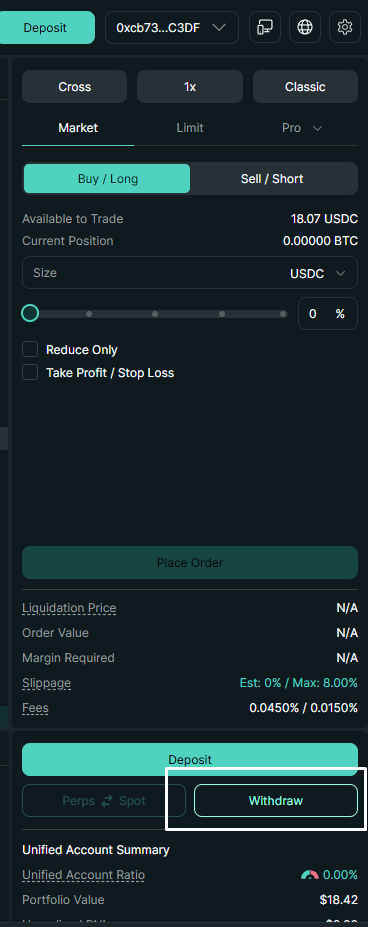
Withdraw button in the trading interface.
Start from the main trading interface.
Click Withdraw to open the withdrawal panel.
Available balance
You can only withdraw funds that are not being used in open positions.
Make sure all positions are closed before withdrawing your full balance.
Step 2 - Define withdrawal details
Screen: Withdraw form
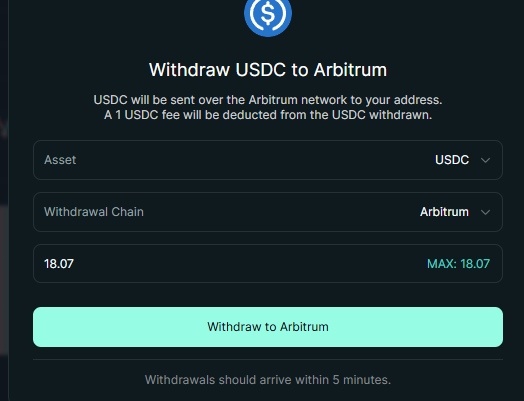
Withdraw form with asset, network, and amount.
You choose:
- asset (e.g. USDC)
- withdrawal network (e.g. Arbitrum)
- amount
The available amount is based on your free balance.
Funds that are currently used in a position are not available for withdrawal.
Withdrawal basics
- withdrawals are processed quickly
- there is a small fixed fee (usually around 1 USDC)
- funds are sent back to your wallet
Step 3 - Confirm withdrawal
Screen: Wallet confirmation (MetaMask)
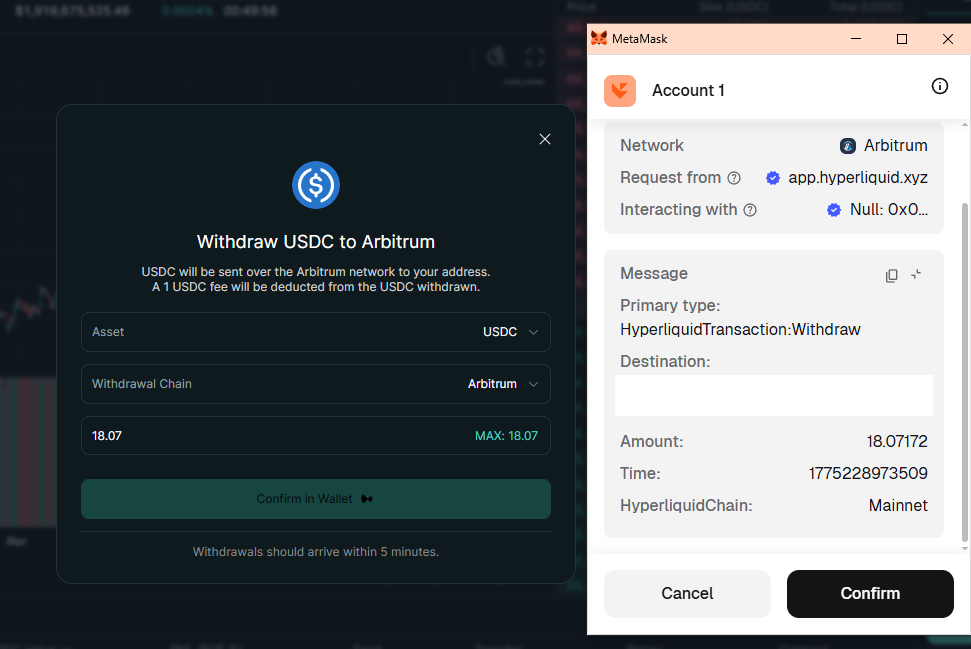
Wallet confirmation popup.
When you confirm, your wallet asks you to approve the transaction.
What happens:
- the withdrawal request is signed
- the transaction is sent to the network
This is the moment where your intent becomes an action.
Step 4 - Funds leave the system
Final state
Once confirmed:
- funds are sent to your wallet
- they leave the Hyperliquid system
- they are no longer part of the trading environment
Where your funds go
After withdrawing, your funds return to your wallet on Arbitrum.
From there, you can keep them, trade elsewhere, or send to an exchange.
Double-check before confirming
Always check:
- the amount
- the network
- your wallet address
Transactions cannot be reversed once confirmed.
How to think about withdrawals
A withdrawal is not just a transfer - it is the moment assets leave the system.
Before withdrawal:
assets define your trading capacity
After withdrawal:
assets return to your direct control
The system only reflects assets as part of its state - it does not hold them outside of it.
Key idea
You can only withdraw what is not currently used in a position.
Reinforcement
Withdrawals follow the same logic as everything else:
- you submit an action
- the system applies it
- the state updates
Once completed, the system no longer includes those assets.
Common mistakes
- trying to withdraw while positions are open
- sending funds to the wrong network
- rushing without checking details
You're in control
From deposit to trading to withdrawal - you control your funds at every step.
Take time to understand the flow, and always move funds carefully.
You can move on when
- You understand why only free balance can be withdrawn
- You can explain what happens after confirming a withdrawal
- You recognize that withdrawn funds are no longer part of system state