Before you deposit anything
- Depositing funds is a real on-chain action
- You are moving assets into the trading environment
- Funds are only available after the system recognizes the deposit
- Responsibility for the transfer stays with you
What this step does
Depositing funds moves assets from your external wallet into the environment where trading happens.
Hyperliquid uses USDC
Hyperliquid uses USDC for trading.
Even if you deposit other assets, they are converted to USDC - so it is simpler to use USDC from the start.
Until this step is completed, you can connect a wallet and explore the interface, but you cannot open positions. The system needs available collateral to allow any trading activity.
This is the first moment where value actually enters the system.
Use the correct network
Make sure you send funds using Arbitrum One.
Using a different network can lead to delays or loss of funds.
Once this is clear, you can start the deposit flow.
Step 1 - Open deposit screen
Screen: Deposit entry point
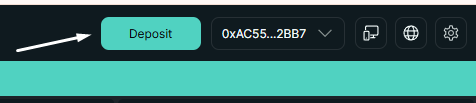
Deposit button in UI
The deposit flow starts from the interface. You open the deposit panel to define what asset you want to transfer and from which chain.
This step does not move funds yet - it prepares the transaction.
Step 2 - Choose asset and chain
Screen: Deposit form
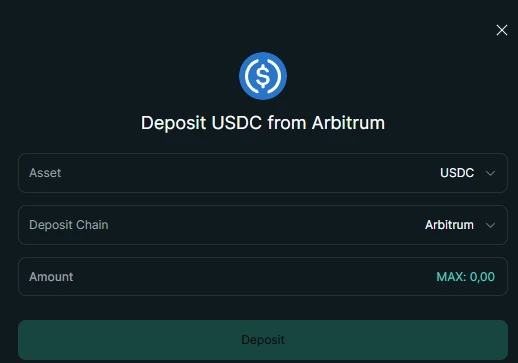
Select asset, source chain, and amount before confirmation.
You select:
- Asset (e.g. USDC)
- Source chain (e.g. Arbitrum)
- Amount
These parameters define how the system will interpret the incoming transfer.
If asset or network does not match the selected deposit route, funds will not be credited through this flow.
Simple option: Deposit by card
Screen: Buy USDC with card
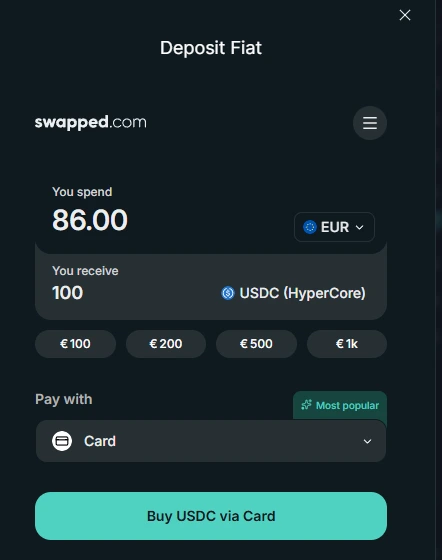
A simple way to fund the account is buying USDC with a card directly from the deposit flow.
Hyperliquid accepts USDC on Arbitrum for this deposit flow.
If your coins are on a different network, they will not be accepted in this flow until they are moved to Arbitrum.
The easiest way to top up is to use the card option and receive USDC in the correct network format.
Step 3 - Confirm deposit transaction
Screen: Wallet confirmation
This step is the continuation of the wallet deposit flow (MetaMask), not the card purchase flow.
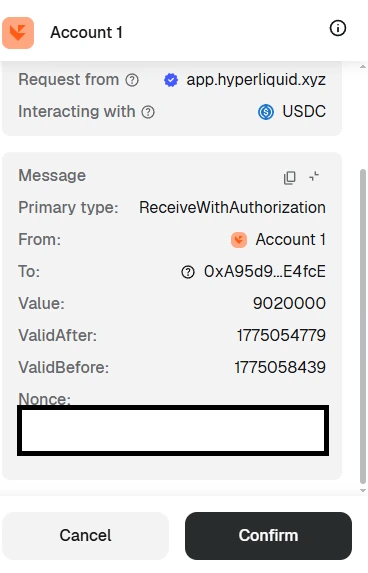
Confirming the transaction in wallet is the point where funds are actually sent.
To confirm a deposit transaction, keep a small amount of ETH on Arbitrum for network gas fees. Without ETH on Arbitrum, the deposit transaction cannot be sent.
At this point, your wallet will ask you to approve a transaction.
First-time approval
The first time you deposit USDC, you will need to approve it.
This is a one-time transaction that allows Hyperliquid to use your funds for trading.
This is where the actual transfer happens. Once confirmed, the action cannot be undone.
Once confirmed:
- Funds leave your wallet
- The transaction is sent to the network
- The system waits for confirmation
Step 4 - Funds become available
Screen: Updated balance
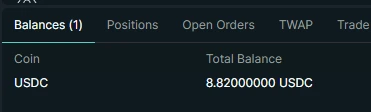
After confirmation, deposited funds appear in your available balance.
Once confirmed, the deposit is reflected in your balance.
At this point:
- funds are part of the system state
- they can be used as collateral
- trading becomes available
There is no additional approval step after this.
Where your funds go
After depositing, your funds are available for trading on Hyperliquid.
You still control them and can withdraw back to your wallet at any time.
How to think about deposits
A deposit is not just a transfer - it is the moment assets become part of the system.
Before the deposit, assets exist outside the system. After the deposit, they define what actions you can take.
The system does not "hold" funds in the traditional sense - it reflects them as part of its current state.
Deposit vs typical exchange
Key idea
A deposit is not just a transfer - it defines what you are able to do in the system.
Reinforcement
Deposits follow the same logic as everything else in the system:
- actions directly affect state
- availability depends on system conditions
- there is no manual intervention layer
Once funds are recognized, they are immediately usable.
You can move on when
- You understand how funds move into the system
- You can explain when a deposit becomes available
- You recognize that availability depends on confirmation, not interface state
Common mistakes
- sending funds on the wrong network
- forgetting to keep a small amount of ETH for fees
- depositing too little to trade effectively
Next step
Now you are ready to open your first trade.