Before you manage a position
- A position is not static - it continuously updates with the market
- Profit, loss, margin, and risk are recalculated in real time
- There is no pause or "safe state" after opening
- The same system rules that create a position also update and close it
What this step does
Managing a position means understanding how it behaves after it is opened.
Once your position is live, it becomes part of a continuously updating system. Its value, risk, and requirements are not fixed - they evolve with every price change.
This is not something you manually trigger. The system updates your position automatically as conditions change.
Managing your position
Opening a trade is just the first step. Managing it is what determines your result.
Even a good entry can turn into a loss if you do not manage risk properly.
Step 1 - View your active position
Screen: Positions tab / active position panel

Open position with live PnL, entry price, and size metrics.
Your position appears in the interface as a set of live metrics.
Here is how to read each field:
- Ticker - the market your position belongs to (for example, BTC).
- Size - how large your exposure is in that market.
- Position value - the notional value of your current exposure.
- Entry price - the average price where the position was opened.
- Mark price - the current reference price used to evaluate the position.
- PnL - unrealized profit or loss based on the distance between entry and mark price.
Understanding profit and loss
Your position shows real-time profit and loss (PnL).
- green - profit
- red - loss
This updates continuously as the market moves.
Step 2 - Understand margin
Screen: Position controls (Liq. Price / Margin / Funding / Close / TP-SL)

Position controls row with Liq. Price, Margin, Funding, Close actions, and TP/SL.
This row combines risk state and actions. Read it left to right:
- Liq. Price - boundary where the system can no longer keep the position valid.
- Margin - current collateral support (and mode, e.g. Cross) behind the position.
- Funding - periodic transfer component that affects net position economics over time.
- Close: Limit / Market / Reverse - direct actions to reduce, close, or flip exposure.
- TP/SL - predefined exit conditions for profit capture or downside control.
Margin is not a stored value. It is a continuously enforced condition that determines whether your position can continue to exist.
Margin validity depends on the relationship between:
- your collateral
- your position size
- current market conditions
As the market moves, this relationship changes automatically.
This is why risk is continuous: a position is valid only while margin requirements are satisfied.
Margin is not a one-time requirement - it is continuously enforced.
Step 3 - Close or adjust your position
Screen: Position actions (Close / TP-SL / Reverse)
Position controls row with Close / TP-SL / Reverse actions.
From this panel, you can change or exit your position.
Each action directly changes your position. There is no separate management layer.
Closing your position
You can close your position at any time.
- Market - executes immediately at current market conditions
- Limit - closes at your chosen price
Closing the position locks in your profit or loss.
Close All
Screen: Confirm close all
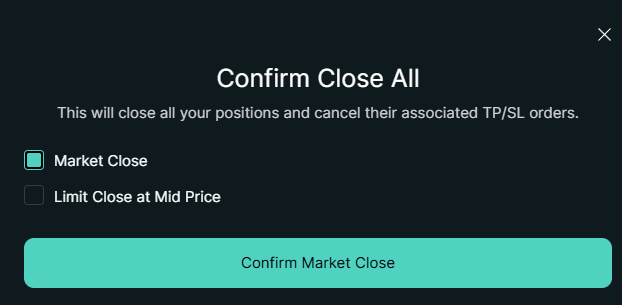
Confirm Close All modal.
This action closes all your open positions immediately.
What happens:
- the system closes 100% of your open positions
- any active TP/SL orders tied to those positions are canceled
- your market exposure goes to zero across all open positions
This is a full account-level exit from all active positions.
If you need more control, use Market or Limit close for a specific position.
Market Close
Screen: Market close modal
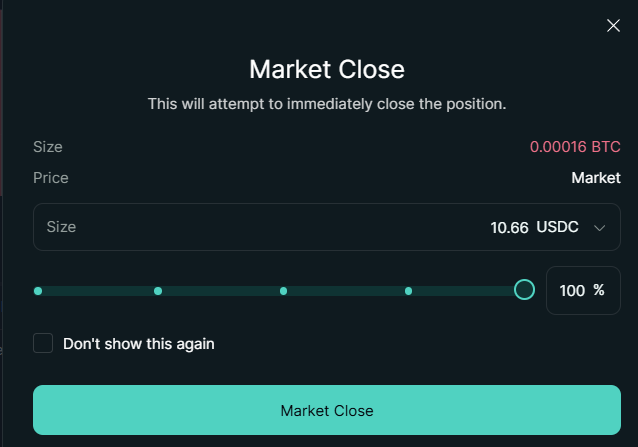
Market Close modal.
Market close reduces or closes your position at the current market price.
You choose:
- how much of the position to close (size or %)
What happens:
- the order is executed immediately
- your position size decreases (or becomes zero)
- your balance is updated
This is the fastest way to exit.
Limit Close
Screen: Close modal (Limit mode)
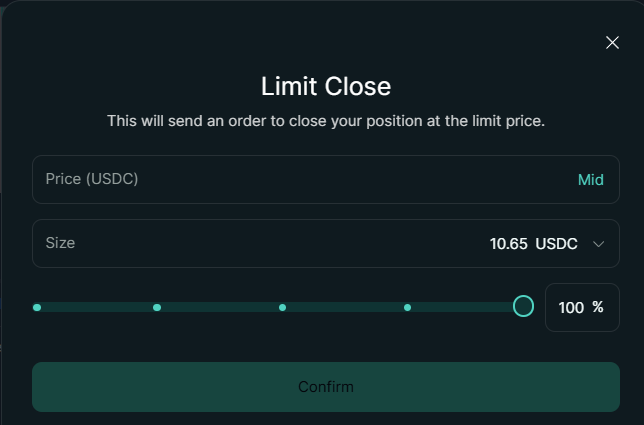
Close modal in Limit mode with limit price input.
This uses the same panel as Market Close, but switched to Limit mode with a limit price input.
Limit close places an order to close your position at a specific price.
You choose:
- the price
- how much of the position to close
What happens:
- the order sits in the order book
- it executes only if the market reaches your price
- until then, your position remains active
This gives control over exit price, but not execution certainty.
Reverse
Screen: Reverse action (same order panel)
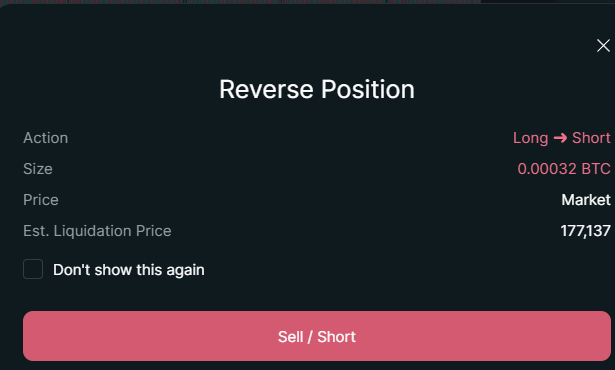
Reverse action in position controls.
Reverse flips your position direction.
This is used when you want to quickly switch direction without manually closing and reopening.
What happens:
- your current position is closed
- a new position is opened in the opposite direction
- this happens as a single combined action
Example:
- Long -> becomes Short
- Short -> becomes Long
This is not a modification - it is a full state transition.
Take Profit / Stop Loss (TP/SL)
Screen: TP/SL modal
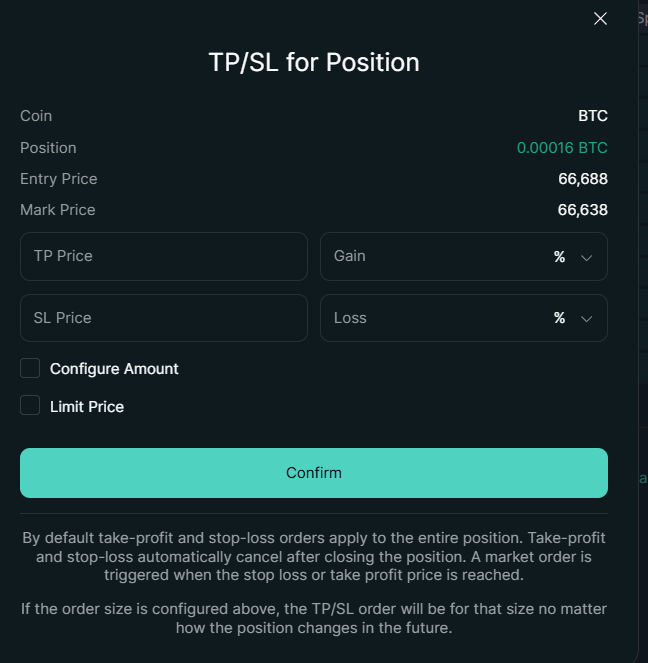
TP/SL modal.
TP/SL defines automatic exit conditions.
Use stop losses
A stop loss automatically closes your position if the price moves against you.
This is one of the most important tools to protect your funds.
Set it when you open the trade or as soon as possible.
TP/SL works by placing conditional orders that execute when price levels are reached.
You set:
- take profit price (or %)
- stop loss price (or %)
What happens:
- the system monitors price conditions
- when a condition is reached, a closing order is triggered
- the position is reduced or closed automatically
These are conditional actions, not guarantees of exact execution price.
Managing risk
Your risk depends on:
- position size
- leverage
- how far your stop loss is
Lower risk setups are easier to manage, especially for beginners.
Do not let losses grow
One of the most common mistakes is holding a losing position too long.
It is better to take a small loss than risk a full liquidation.
What this means
After the individual actions above, here is the core model that ties them together.
Managing a position is not about "holding" or "closing" it as separate processes.
It is about interacting with a system where:
- positions continuously evolve
- risk is continuously evaluated
- and every change comes from a new action
Opening, adjusting, and closing all follow the same rule:
Key idea
Managing and closing a position are not separate processes - both are just actions that change system state.
Reinforcement
Position management follows the same logic:
- you submit an action
- the system applies it
- the state updates immediately
There is no hidden control layer.
You can move on when
- You understand how to close a position using different methods
- You can explain the difference between market and limit close
- You recognize that closing is just another state change
- You understand how TP/SL triggers actions automatically
Common mistakes
- not using a stop loss
- increasing position size after a loss
- overtrading
What's next
Once you are comfortable managing positions, focus on consistency:
- keep position sizes small
- use stop losses
- avoid high leverage
Over time, this matters more than any single trade.